

News & articles
1. Be clear and honest in your answers
Honesty is critical during your visa interview. Always:
- Answer truthfully
- Keep responses short and relevant
- Avoid memorized or robotic replies
Visa officers are trained to identify inconsistencies, so clarity matters more than perfection.
2. Know your application inside out
Before your interview, review:
- Your submitted forms
- Supporting documents
- Key dates and details
If your answers don’t match your application, it can raise concerns.
3. Prepare for common visa interview questions
Some frequently asked questions include:
- Why do you want to go to the United States?
- What is the purpose of your travel?
- What are your future plans?
4. Organize your documents properly
Bring all required documents, such as:
- Passport
- Appointment confirmation
- Financial documents
- Supporting letters
Keep them neatly arranged so you can access them quickly if asked.
5. Dress professionally and stay confident
First impressions matter. You don’t need formal attire, but you should:
- Dress neatly and appropriately
- Maintain eye contact
- Speak clearly and confidently
Confidence often reflects preparation.
6. Manage stress and stay calm
Feeling nervous is normal. To stay calm:
- Take slow, deep breaths
- Arrive early to avoid rushing
- Focus on the present moment
A calm mindset helps you think and respond better.
7. Keep your answers consistent and simple
Avoid over-explaining. Instead:
- Stick to the question asked
- Keep answers concise
- Stay consistent with your application
Simple answers are often the most effective.
8. Common mistakes to avoid in a visa interview
- Providing false or misleading information
- Giving long, unclear answers
- Not knowing your own application details
- Appearing unprepared or disorganized
Avoiding these mistakes can significantly improve your chances of approval.
Thoughts on US visa interview preparation
A successful visa interview is not about being perfect—it’s about being prepared, honest, and confident.
By following these US visa interview tips, you can approach your interview with clarity and reduce unnecessary stress.
Remember: You’ve already completed most of the process. The interview is simply the final step.
How to contact USCIS: Understanding AskEmma, Tier 1, and Tier 2 support
Reaching out to USCIS can sometimes feel confusing, especially if you’re not sure who you’re speaking with or what kind of help they can provide.
Whether you’re checking your case status or trying to resolve a delay, understanding how the USCIS contact system works can save you time and frustration.
This guide explains the different support levels—AskEmma, Tier 1, and Tier 2 agents—and what you can realistically expect from each.
Does USCIS have an email for inquiries?
One of the most common questions applicants ask is whether they can email USCIS.
The answer is no—USCIS does not offer a public email address for general inquiries. This is mainly due to privacy and security concerns.
Instead, USCIS provides support through:
- Phone assistance
- Online tools
- Virtual chat (AskEmma)
USCIS contact center hours
The USCIS contact center is typically available:
- Monday to friday
- 8:00 AM to 8:00 PM (eastern time)
Outside of these hours, you’ll interact with an automated system that can still answer basic questions in english and spanish.
AskEmma: The first step for quick help
AskEmma is USCIS’s virtual assistant available on their website. It’s usually the first point of contact for many users.
What AskEmma can help with
- Answer common immigration questions
- Provide general case status updates
- Guide you to the right resources
- Connect you to a live Tier 1 agent (when available)
Limitations of AskEmma
- Cannot access full case details
- Provides mostly standardized responses
- Cannot offer legal advice or complex case guidance
For simple questions, AskEmma is quick and convenient. But for anything more detailed, you’ll likely need further assistance.
Tier 1 agents: Basic customer support
Tier 1 agents are customer service representatives available via phone or chat.
They are trained to handle general inquiries but are not immigration officers.
What Tier 1 agents can do
- Answer frequently asked questions
- Check limited case information
- Help with non-complex issues
- Create service requests for further review
What they cannot do
- Access complete case history
- Make decisions or updates on your case
- Provide personalized or legal advice
If your issue cannot be resolved at this level, the agent will escalate it.
Tier 2 agents: Immigration officers with case access
Tier 2 support consists of trained Immigration Services Officers who have deeper access to your case.
You don’t contact Tier 2 directly—your issue must be escalated through Tier 1.
What Tier 2 agents can do
- Review detailed case information
- Respond to escalated service requests
- Clarify case-specific concerns
- Assist with certain urgent situations
They may also help coordinate:
- Emergency travel documentation
- Proof of residency (such as temporary stamps)
- Specialized case types requiring attention
What tier 2 agents cannot do
- Approve or deny your application on the spot
- Schedule interviews or ceremonies
- Override decisions already made on your case
- Provide legal advice
How USCIS follows up on requests
If your case is escalated to tier 2, here’s what usually happens:
- You may receive a phone call or message from USCIS
- They typically attempt contact more than once
- If you miss the call, you may need to reopen the request
Because of this, it’s important to:
- Keep your phone accessible
- Monitor messages regularly
- Respond promptly when contacted
Tips for getting better support from USCIS
To improve your experience when contacting USCIS:
- Be clear and specific when explaining your issue
- Have your receipt number ready before calling
- Take note of your service request number
- Avoid unnecessary escalations unless truly needed
Clear communication helps ensure your request is handled correctly and efficiently.
Common mistakes to avoid
Many applicants face delays because of simple mistakes, such as:
- Expecting tier 1 agents to resolve complex issues
- Missing follow-up calls from tier 2
- Not keeping track of service request numbers
- Contacting USCIS repeatedly without new information
Avoiding these can save you time and reduce frustration.
Final thoughts
Understanding how USCIS communication works can make a big difference in your immigration journey.
AskEmma, tier 1 agents, and tier 2 officers each play a specific role. Knowing their limitations—and when to escalate—helps you get the right support faster.
If used correctly, the USCIS contact system can be a helpful tool rather than a stressful experience.
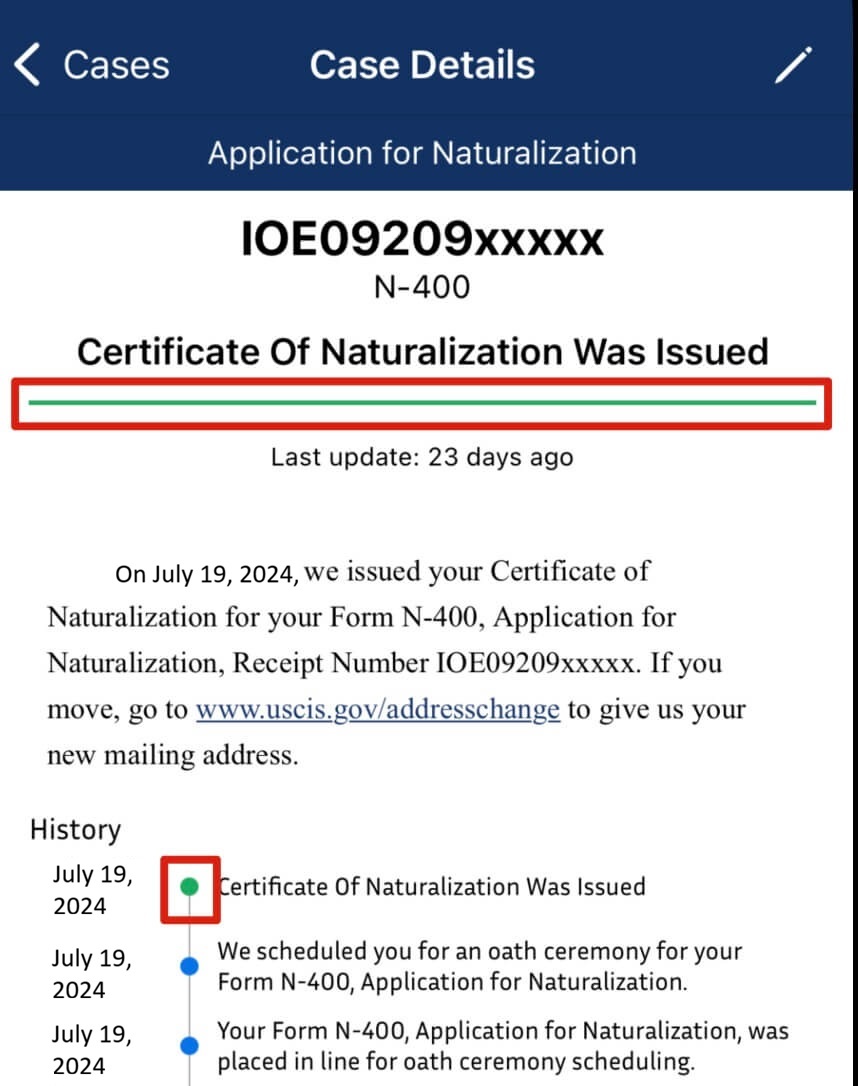
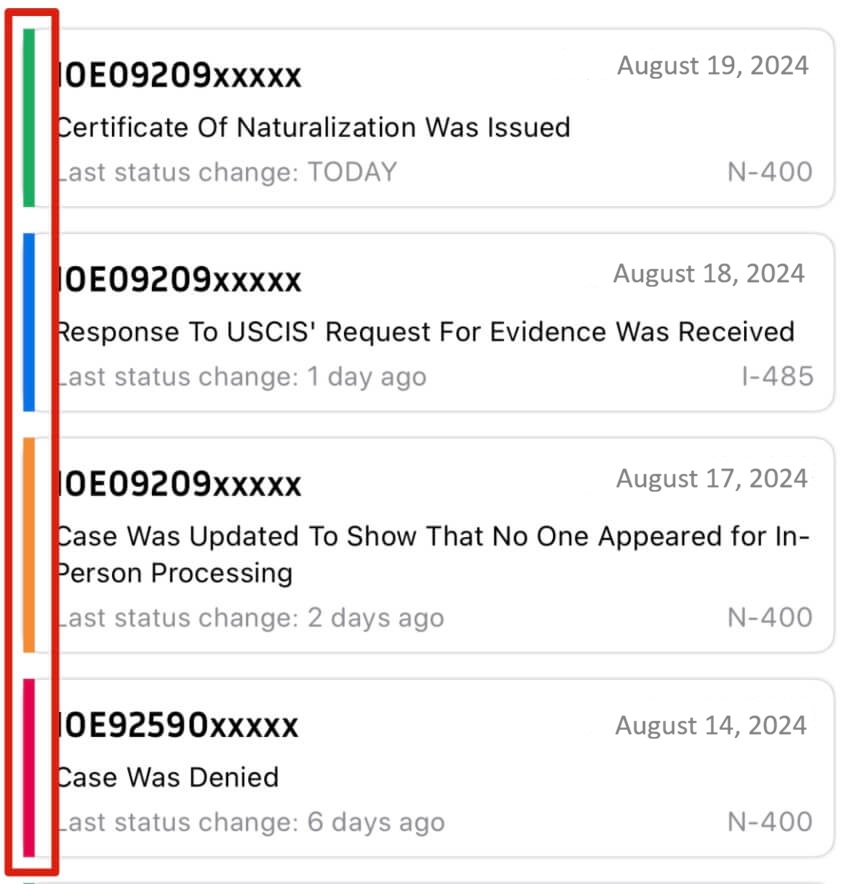
We use four color indicators to help you quickly understand your case status:
- Green – Indicates a favorable outcome, such as your case being approved, issued, or your card successfully delivered.
- Orange – Means action may be required, such as responding to a Request for Evidence (RFE) or addressing time-sensitive updates.
- Red – Signals a problem with your case, such as denial, rejection, refusal, expiration, or delivery issues.
- Blue – Represents regular case updates that do not require action and indicate normal processing.
The initial stage of a USCIS case is “Case was received and a receipt notice was
sent.” This indicates that your application has been successfully received and is under
review. At this point, no decision has been made and no action is required from you, so it will
appear in blue.
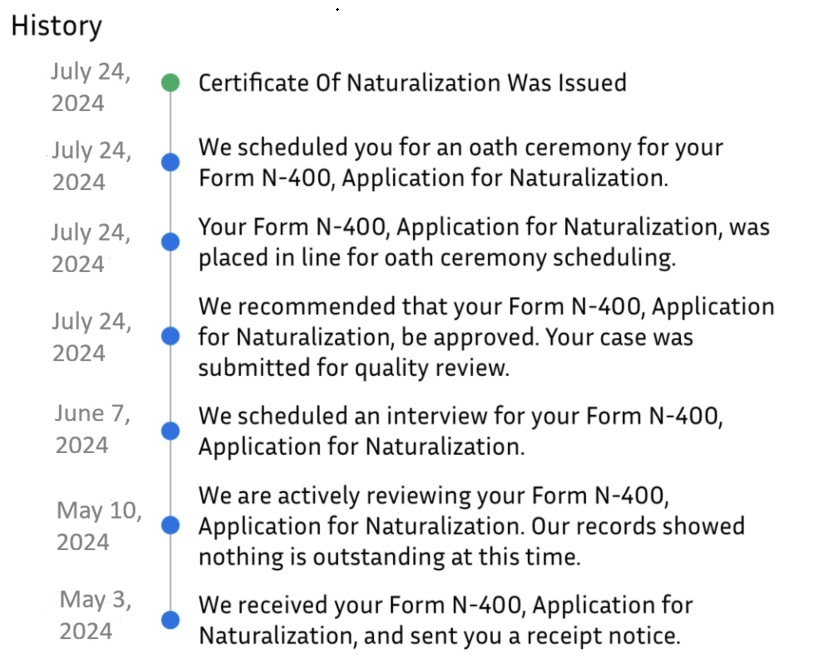
As your case moves forward, the status will update to reflect each new stage. The app will track
these updates in your case history, with a corresponding color displayed next to each step. See the
example below for reference:
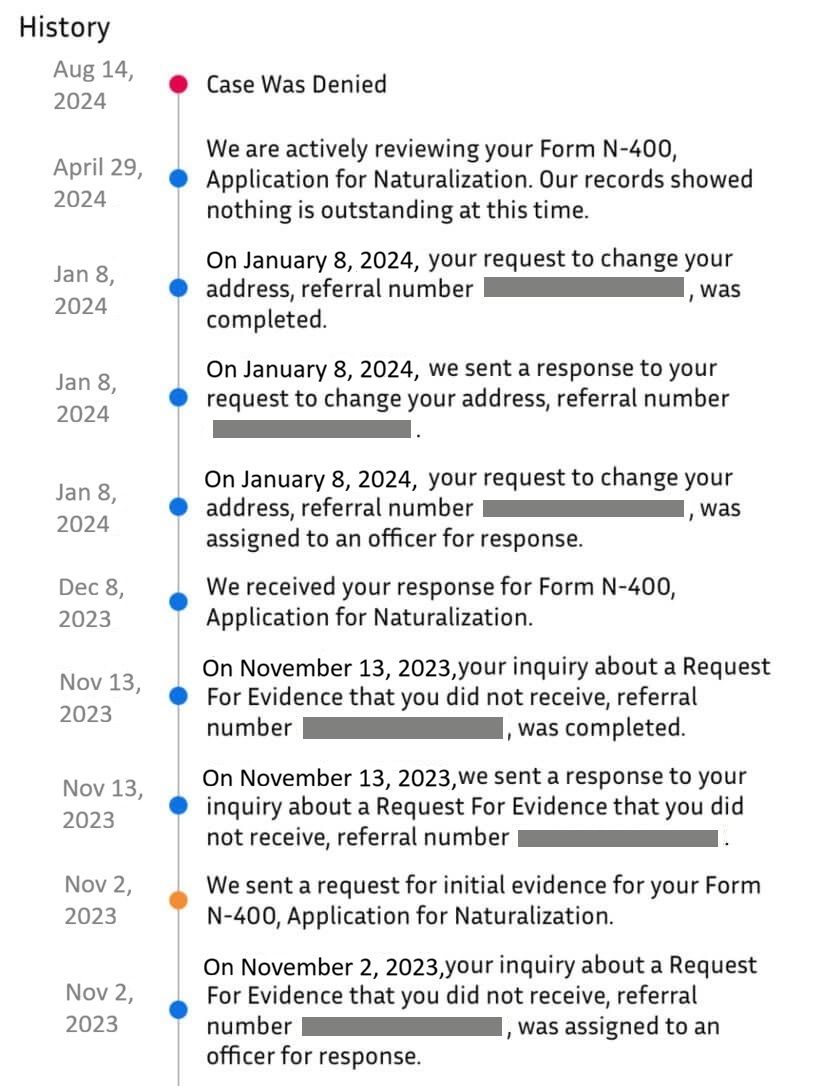
This shows a green indicator, confirming that the case has been completed successfully. Other status updates were routine and displayed in blue.
Another example is shown below:
This example includes multiple status colors—blue, orange, and red. Each color represents the case status at a specific point in its history. For example, in November, a request for evidence (RFE) was issued, which required action and is therefore shown in orange.
These same color indicators are also used on the Cases list screen:
This is also shown on the case details screen: